ArtCraft PdfCraft: PDF Tools, Official Downloads and Acrobat Limits
Explore PdfCraft for reading, merging, splitting and protecting PDFs, with official downloads, documented alpha limitations and a practical output-validation guide.
PdfCraft is ArtCraft's open-source PDF application for viewing, organizing, annotating and protecting documents. Its official README also makes an important qualification: the application is alpha, Office conversion remains weak, and several advanced Acrobat workflows are incomplete. It is worth evaluating for a precise PDF task rather than treating the phrase “Acrobat alternative” as a complete compatibility promise.
Sources checked October 12, 2026. This article reviews official documentation and release metadata. No desktop benchmark, redaction audit or digital-signature validation was performed by Uudir.
Find the official PdfCraft
Use getartcraft.com/apps/pdfcraft and storytold/pdfcraft. The application is one of ArtCraft's separate Crafting Apps, distinct from the AI image/video studio. Similarly named PDF converters found elsewhere should not be assumed to be related.
The repository describes a Rust implementation with desktop and WebAssembly builds. It lists MIT OR Apache-2.0 for project code and separate attribution for bundled assets. Open source gives users a way to inspect and modify software; it does not itself establish document fidelity or a certification for sensitive workflows.
What PdfCraft says it can do
The README's current-status section lists viewing and search, page organization, combining and splitting, comments, forms, passwords, redaction, sanitizing, basic digital signatures, printing and an accessibility checker. CLI and MCP interfaces offer automation paths as well.
Those functions serve different goals. Combining pages assembles a packet; annotations communicate review; form filling changes field values; redaction is intended to remove information. Choosing the right operation matters because a visually similar output can carry a different underlying document structure.
PdfCraft versus Acrobat: compare the actual job
| Job | Documented PdfCraft position | What to verify |
|---|---|---|
| Read and search | Listed among current strengths | Text order, embedded fonts and difficult pages. |
| Merge, split and reorder | Core page-organization workflows | Page count, sequence, orientation and bookmarks. |
| Fill forms and comment | Documented features | Saved field values and annotations in another viewer. |
| Protect or redact | Passwords, redaction and sanitizing listed | Reopen behavior and whether intended information is truly removed. |
| Digital signatures | Basic support | Existing signature status, trust chain and recipient requirements. |
| Office conversion | Explicitly weak | The README says no Office-to-PDF and layout loss in Word export. |
| Professional production | Several gaps remain | PDF/X, PDF/UA, Preflight and printer-specific requirements. |
The comparison is drawn from PdfCraft's own documentation. It is not a claim that all editions of Acrobat behave identically, or that listed PdfCraft operations have passed our tests.
The limits you should read before installation
The project roadmap summary explicitly calls out unreliable existing-text editing, especially CJK and right-to-left text, OCR beyond Latin scripts, Office import/export, advanced signature validation, full XFA forms and production-preflight gaps. It also says quality has not yet been compared with Acrobat side by side.
For a Chinese-language office, CJK editing and OCR are practical adoption questions, not footnotes. A scan can look perfectly readable while its recognized text is inaccurate. A PDF-to-Word output can contain the words while losing the layout. If conversion is your primary need, the project's stated limitations should guide your evaluation before its feature list does.
Download and first launch
The release metadata checked here returned PdfCraft v0.6.0. The README recommends the official product page for a straightforward download and the latest GitHub release for specific packages.
Choose your operating system and architecture, read the release notes and compare the supplied checksums. The documentation lists Windows installer and portable options, macOS packages and several Linux formats, with additional builds described in the download section. Availability and requirements should be checked against the release you actually install.
Start with an ordinary, disposable PDF and save an edited copy. Keep the original unchanged until you have opened the result elsewhere. If you build from source, follow the current repository instructions, including model assets where needed for OCR, rather than assuming a source archive contains every runtime resource.
A reliable page-organization trial
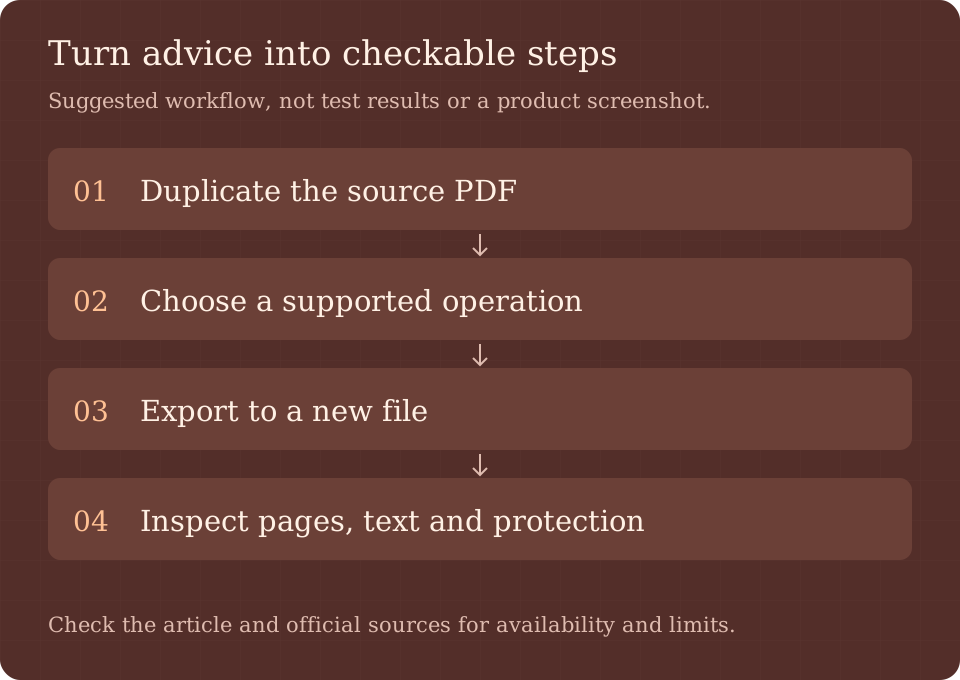
- Duplicate a short document with recognizable page numbers and mixed portrait/landscape pages.
- Choose one operation first: reorder, split, merge or rotate.
- Write down the expected page count and order before saving.
- Export to a new filename and open it in a separate PDF viewer.
- Check page sequence, rotation, text search, bookmarks and links.
- Repeat with comments or forms only after the basic document round trip is satisfactory.
For a merge trial, use a three-page document and a two-page document: a simple concatenation should contain five pages. That is the expected result for your test, not an observed PdfCraft benchmark. Check pages visually and search for a phrase from each source; counting thumbnails alone can miss a rendering or text-layer problem.
Passwords, redaction and signatures need different checks
A password test should confirm that the intended recipient can open the saved copy with the expected password and that the unprotected original has not accidentally been distributed. Use a disposable password and sample document during evaluation.
For redaction, do not equate a black rectangle with removal of underlying text. Reopen the saved result in another viewer and attempt text search and extraction for the removed phrase. That check is a useful acceptance step, not a comprehensive forensic guarantee. For high-stakes disclosure, use the organization's established validation process until the tool has been assessed for that requirement.
Digital signatures are also distinct from a drawn signature image. Editing a signed PDF can affect signature validity. Test the actual recipient's verification process, and review the documented limits around tokens and online long-term validation before introducing PdfCraft into an established signing workflow.
Who should try PdfCraft first?
Users organizing noncritical PDFs, reviewing comments or exploring scriptable local document workflows have a clear, bounded pilot. Users who require exact Office conversion, broad multilingual OCR, professional print preflight or strict signature validation should treat those requirements as separate acceptance gates.
If the source document is editable text, it may be simpler to change that source and export a new PDF than to edit existing PDF text. Our WordCraft guide covers one such authoring option, with its own alpha-stage caveats. For all official app entry points, see the ArtCraft download guide.
Frequently asked questions
Is PdfCraft free and open source?
The official catalog calls the Crafting Apps free, and PdfCraft's code uses MIT OR Apache-2.0. Bundled assets and branding retain their own notices.
Can it merge and split PDFs?
The README explicitly lists combining, splitting and page organization. Validate the saved output against your expected page sequence and content.
Can PdfCraft replace Acrobat Pro completely?
The project's own alpha-stage assessment does not support that claim. Conversion, advanced signatures, production validation and other areas have documented gaps.
Does this article prove its redaction is secure?
No. We did not perform a redaction audit. The suggested checks help structure evaluation but are not a security certification.
Primary sources
Read the official PdfCraft page, README, roadmap and v0.6.0 release. Revisit their current limitations before upgrading an important workflow.