EffectCraft Guide: Downloads, After Effects Comparison and Limits
Explore EffectCraft downloads, animation, effects, 3D and export formats, with documented After Effects compatibility limits and a five-second evaluation workflow.
EffectCraft is ArtCraft's open-source motion graphics and compositing application. It is worth evaluating for a small animation, but its own maintainers say it is not yet a replacement for After Effects on client work. In particular, it cannot open After Effects .aep or .aepx projects, and After Effects plug-ins do not run in it.
This guide connects the official download to the actual work: layers, keyframes, effects, output formats and a repeatable acceptance exercise. It also separates EffectCraft from the ArtCraft AI image and video studio, which is a different application.
Sources checked October 13, 2026. This is a review of official documentation, not a hands-on benchmark. Feature descriptions below are project claims from the main-branch README; they may be newer than a downloaded release. Our GitHub latest-release checks returned v0.8.0, published October 11.
EffectCraft at a glance
| Question | Source-checked answer |
|---|---|
| What is it for? | Animated titles, motion graphics and layered compositing. |
| Official entry point | EffectCraft product page. |
| Source and downloads | storytold/effectcraft and its latest release. |
| Project format | Readable, versioned JSON in .ecproj files. |
| After Effects interchange | No .aep/.aepx opening and no After Effects plug-in support, according to the status section. |
| Maturity | Alpha; feature presence is not render parity. |
| Code license | MIT OR Apache-2.0, with separate asset and branding terms. |
Use the ArtCraft GitHub and download guide for the family-wide repository map. EffectCraft is the motion-graphics branch; FilmCraft is the video editor, while the separate ArtCraft studio connects to AI providers. Choosing by the family name alone is an easy way to install the wrong app.
Read these limitations before installing
The Where it stands section states:
“It isn't yet a replacement for After Effects on client work.”
It also says:
“After Effects projects can't be opened.”
These are the maintainers' words. Their README describes the project as alpha and gives estimates of about 91% feature presence and about 45% progress toward professional replacement. Those are internal estimates, not independent compatibility scores or percentages of client projects that will work.
Four practical consequences follow. First, an existing .aep project is not a migration starting point: plan a small rebuild or a rendered-media handoff instead. Second, a familiar effect name does not establish identical pixels or parameter behavior. The README says automatic render comparisons against After Effects have not yet established parity. Third, macOS is the most tested platform; Windows and Linux have had basic interaction bugs. Fourth, the optional MobileSAM Roto Brush and MediaPipe face-tracking models have not been compared against After Effects either.
The known gaps and roadmap are better adoption signals than a star count. Read them for the exact version and workflow you intend to use. Keep your current production tool available until your acceptance test passes.
Animation: compositions, layers and keyframes
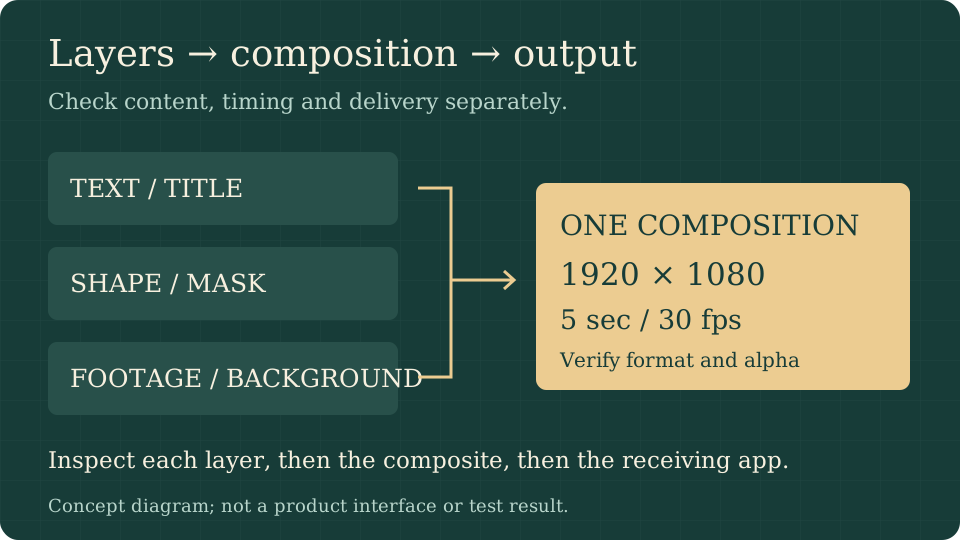
The Animate documentation describes solid, shape, text, footage and nested-composition layers, plus nulls, adjustment layers, cameras and lights. It lists parenting, track mattes, 38 blend modes and motion blur. A composition combines those layers into one timed output; a nested composition lets you reuse a group without rebuilding it.
Keyframe options include linear, Bezier, hold, auto/continuous Bezier, roving keys and Easy Ease. The Graph Editor has value and speed graphs. For a title, linear opacity can establish the simplest baseline; easing can then change the pace of the reveal. Comparing the exported frames matters more than whether the curve looks familiar in the editor.
The README also lists time remapping, time stretch, reverse and freeze frame; shape operators such as trim paths, repeaters and merge paths; editable feathered masks; text animators with range selectors; and JavaScript expressions using an After Effects-style object model, including wiggle and loopOut. These are documented capabilities, not a guarantee that an existing expression-heavy template will transfer unchanged.
Effects and 3D: what is actually documented?
The Effects section claims 306 effects. It names blur/sharpen, channel operations, color correction, distortion, generation, keying, mattes, noise/grain, perspective, simulation, stylization, time, audio, text and transitions. Examples include Curves, Levels, Lumetri Color, Turbulent Displace, Fractal Noise, CC Particle World, Glow and Timewarp. Nine Layer Styles, including shadows, glows, overlays and Stroke, are also listed.
Treat that count as the project's inventory, not an independently tested comparison with every After Effects edition. For an evaluation, choose the one effect your deliverable needs and inspect its edges, transparency and behavior over time. A list of hundreds of effects cannot answer whether one particular combination is reliable.
The 3D section describes Classic 3D layers, orientation and material options, one- and two-node cameras with depth of field, parallel/spot/point/ambient lights, soft ray-traced shadows and intersecting layers. Front, Top, Left and Custom views and orbit/pan/dolly controls are documented. This is not a claim that EffectCraft replaces a general-purpose 3D modeling suite or supports every external 3D workflow.
Export formats and the handoff that matters
The Export section describes a Render Queue with Render Settings and Output Modules, also reachable from the command line. Its current format list is substantial:
| Delivery type | Documented formats | Check before using it |
|---|---|---|
| Review or distribution video | H.264 MP4; HEVC Main/Main 10; AV1 MP4 | Playback, duration, frame rate and audio in the receiving app. |
| Editing intermediate | ProRes MOV, Proxy through 4444 XQ with alpha | Profile, alpha interpretation and the editor's import support. |
| Web video | WebM with VP9 or AV1; Opus audio | Browser support and transparency in your actual playback path. |
| Image sequence | PNG, JPEG, TIFF, 32-bit EXR | Frame numbering, color handling, missing frames and disk requirements. |
| Other output | Animated GIF, WAV/AIFF | Palette/timing for GIF and channel/sample handling for audio. |
| Web/app animation | Lottie JSON or .lottie; Lottie import also documented | Unsupported-feature warnings and the target Lottie renderer. |
The README says its encoders are written in Rust and do not embed FFmpeg. That architectural choice does not prove encoding quality, speed or downstream compatibility. A file that plays in one preview window still needs to be opened by the application that will receive the final delivery.
For Lottie, the project describes an export that lists features the format cannot express. Start with a small shape animation, read that report and inspect the result in the renderer used by your site or app. A compositing effect available in the desktop editor need not have a Lottie equivalent.
EffectCraft versus After Effects: compare your job
| Your requirement | What EffectCraft documents | Adoption gate |
|---|---|---|
| A new animated title | Text, keyframes, easing and effects | Font shaping, edge quality and timing survive export. |
| An existing After Effects project | .aep/.aepx cannot be opened | Budget for rebuilding; do not assume a native project round trip. |
| A third-party After Effects plug-in | Those plug-ins do not run | Find a documented native workflow or retain After Effects. |
| Layered compositing | Mattes, blend modes, masks and adjustment layers | Check alpha, color and blend results on representative footage. |
| Camera movement | Classic 3D layers, lights and cameras | Check intersections, shadows and depth of field in the render. |
| Automated delivery | CLI, JSON control channel and MCP | Reproducible output, clear failures and constrained access to files. |
| Client production | Project is alpha; parity is not established | Complete a parallel pilot before committing a deadline. |
This is an acceptance checklist, not a winner/loser ranking. If you only need a new five-second title, rebuilding may be inexpensive. If your workflow depends on years of templates, expressions and plug-ins, migration is a different project.
EffectCraft downloads and system requirements
Begin at the official app page, then check release assets. GitHub's green Code button offers source, not necessarily an installable application. Our latest-release API checks returned v0.8.0; follow the live release page when installing instead of treating this article as a permanent version pin.
| Platform | README download targets | Important distinction |
|---|---|---|
| Windows | x64, ARM64 and x86 MSI or portable ZIP | Match CPU architecture. The README describes signed installers/executables. |
| macOS | Universal DMG and a separate universal CLI ZIP | Apple silicon and Intel; the project describes signing and notarization. |
| Linux | x86_64/aarch64 AppImage, Flatpak, deb, rpm and tar.gz | Use a format appropriate to your distribution. |
| Linux RISC-V | riscv64 tar.gz | README specifies glibc 2.39 or newer. |
| FreeBSD | x86_64 tarball | A listed target is not proof of identical testing coverage. |
| Web | Static WebAssembly ZIP | See the browser-specific documentation and current package. |
The reviewed README does not give a universal minimum RAM/GPU specification. We therefore do not invent one or assume every listed platform performs equally. Source builds require Rust 1.95 or newer according to the Get started section; this is a build-tool requirement, not a runtime requirement for an installer.
On Windows ARM64, the project reports native installer/CLI checks but says the window and full test suite are not yet exercised natively in that check. On native Linux Wayland, it documents a file drag-and-drop limitation: use File → Import → File. XWayland is another documented option. These details are more useful than a generic “cross-platform” label.
Download and first-launch checklist
- Confirm the repository is storytold/effectcraft, not the separate AI studio.
- Read the release notes and status section, and select a package for your OS and CPU.
- If supplied for that release, compare the downloaded file with SHA256SUMS.txt. A matching hash confirms matching bytes, not an independent security audit.
- Install using the documented package path. Preserve the original installer and note the version used for your test.
- Open a sample or create a disposable composition before importing working assets.
- Save a new .ecproj file and check that it reopens before spending time on an animation.
A five-second motion-graphics acceptance test
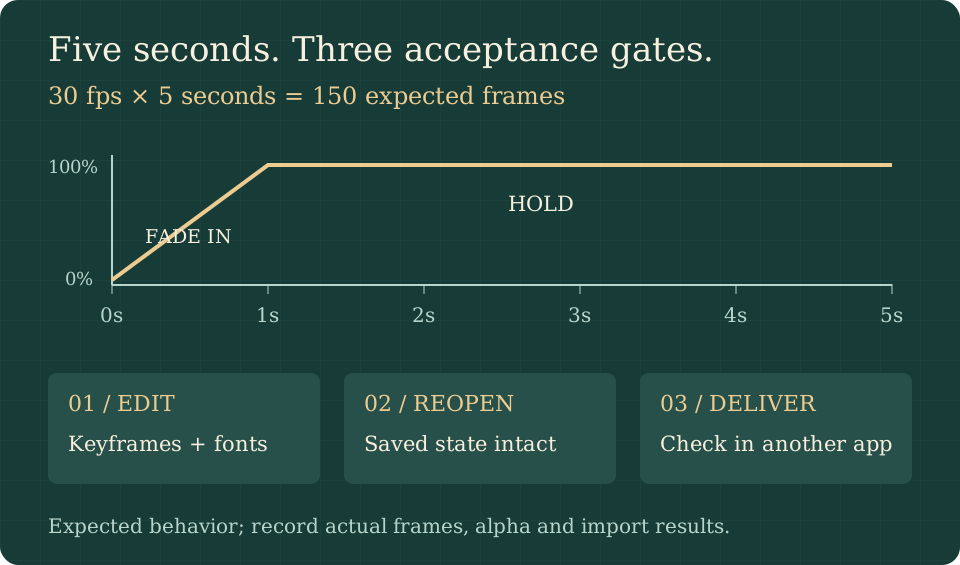
Use a 1920 × 1080 composition, five seconds long, at 30 fps. The expected output is 150 frames. This is arithmetic for the proposed exercise, not a measured EffectCraft result. If you choose 25 fps instead, expect 125 frames; avoid changing frame rates halfway through your first test.
- Add one text layer using a font you actually deliver with, plus a simple shape behind it. Use a duplicate of any source media.
- Keyframe text opacity from 0% at the start to 100% at one second. Confirm the remaining duration holds the intended state.
- Apply one documented effect you need, such as Glow. Keep a baseline copy without the effect so you can isolate a difference.
- Save, close and reopen the .ecproj. Confirm that layers, timing, fonts and settings are preserved.
- Queue an export to a new filename using the format your receiving editor accepts. If you need transparency, choose an alpha-capable format/profile rather than assuming ordinary MP4 preserves it.
- Open the render in a separate player and your finishing editor. Check duration, frame rate, decoded frame count, text legibility and the first/last frame.
- For alpha, place the export over light and dark backgrounds. Inspect halos and whether the receiving app interprets alpha as straight or premultiplied.
- Record the version, operating system, format/profile, expected result, observed result and any workaround. Re-test this small file after an update before reopening a complex job.
| Check | Expected result | Record your observation |
|---|---|---|
| Duration and count | 5 seconds; 150 frames at 30 fps | Player/editor reading and any disagreement. |
| Text | Correct font, shaping and line breaks | Missing font or substitution, if any. |
| Animation | Reveal completes at one second | Any discontinuity, flicker or timing shift. |
| Transparency | Intended edges over light/dark backgrounds | Halos, opaque areas or import adjustments. |
| Reopening | Saved composition retains the edit | Changes after save/reopen. |
| Delivery | Receiving editor imports the output | Required conversions or unsupported settings. |
For a two-week pilot, repeat one real deliverable alongside your established workflow and record correction time as well as render time. The PdfCraft guide uses the same principle for documents: verify the exported result in a separate receiving application.
Automation, AI and license boundaries
The Built for agents section documents effectcraft-cli, an MCP server over stdio, and a JSON control channel that can inspect and operate the app. Automation can help reproduce a render, but it does not prove correctness. Start with disposable files, retain the command and output logs, and verify the frame you intended to produce.
EffectCraft does document optional machine-learning models for Roto Brush and face tracking. That is different from the separate studio's AI image/video generation service. Do not interpret an open-source editor license as unlimited hosted generation, provider credits or proof that an external agent never transmits data.
The License and credits section states: “EffectCraft is dual-licensed under MIT or Apache-2.0, at your option.” Bundled assets have individual terms in ATTRIBUTION.md, required notices are in NOTICE, and ArtCraft branding has separate restrictions. The project also explicitly disclaims affiliation with Adobe. Read those notices before redistribution; a code license does not erase asset or trademark conditions.
Frequently asked questions
Is EffectCraft free and open source?
Yes, its project code is published under MIT OR Apache-2.0. Review separate asset, notice and branding terms. This does not grant free access to unrelated hosted AI services.
Can EffectCraft completely replace After Effects?
The maintainers say it is not yet a replacement for client work. It cannot open .aep/.aepx or run After Effects plug-ins, and output parity is not established. Evaluate a bounded new task before considering a migration.
Which version should I download?
Use the official latest-release page and read the notes for your platform. On our October 13 source check, the API returned v0.8.0. Main-branch documentation may describe newer development than a release package.
What are EffectCraft's minimum system requirements?
The README lists platforms and architectures but does not provide one universal RAM/GPU minimum. Rust 1.95+ is for compiling the source. RISC-V Linux has a documented glibc 2.39+ requirement. Check package-specific notes and test a small composition on your machine.
Does it support Lottie or transparent video?
Both Lottie import/export and alpha-capable outputs such as ProRes 4444 and VP9 WebM are documented. Lottie cannot express every compositing feature, and transparency depends on the selected output and receiving application. Test the actual handoff.
Did Uudir install or benchmark EffectCraft?
No. We reviewed official documentation and release metadata. The diagrams and acceptance exercise explain how you can evaluate it; they are not product screenshots, measured performance or a certification.
Primary sources and related reading
- Official EffectCraft page: product identity and installation entry point.
- Official README: Animate, Effects, 3D, Export, Downloads, Status and License sections.
- Latest release and v0.8.0 release: package and version evidence.
- Known gaps, roadmap and web documentation: maturity and platform boundaries.
- Asset attribution and required notices: licensing context.
- ArtCraft repository map, PdfCraft evaluation guide and Brandon Thomas and ArtCraft: the rest of this editorial series.
Uudir Editorial Team · October 13, 2026. Original explanatory diagrams by Uudir; no render benchmarks performed.