Wordcraft AI: Google PAIR Writing Tool, Online Access and Alternatives
Find the real Google PAIR Wordcraft project, understand its online workshop, set up the research editor, and compare writing alternatives without confusing ArtCraft WordCraft.
Google PAIR Wordcraft is an experimental AI writing editor focused on short stories. Its official online workshop is available to read, and its editor source is public. Those are different forms of access: a published collection of AI-assisted stories does not establish that a hosted, interactive editor is open to everyone.
Reviewed October 12, 2026 using the official repository and workshop. This is a source-based guide; we did not install the editor or run model requests.
Which Wordcraft are you looking for?
The PAIR-code/wordcraft repository identifies the project as a Google PAIR research tool and explicitly says it is not an officially supported Google product. Its purpose is to explore how a writing interface can make generative models useful to authors.
ArtCraft's similarly named WordCraft is a separate product. If your search is about document editing inside ArtCraft, use our ArtCraft WordCraft review. Do not follow Google research setup instructions expecting to install an ArtCraft component. Our ArtCraft GitHub download guide covers that separate discovery path.
Can you try Wordcraft AI online?
The official short link in the repository leads to the Wordcraft Writers Workshop. This site presents a collaboration involving Google's PAIR and Magenta teams and 13 professional writers. You can read the published stories and project background in a browser.
We verified the workshop page, not an unrestricted hosted writing session. Therefore, “read the online workshop” is a supported recommendation; “click here for a free live AI editor” is not. If another site promises instant Wordcraft access, check its operator, billing and data handling separately.
| What you want | Verified starting point | What it does not guarantee |
|---|---|---|
| Read writing created in the project | Official workshop and story collection | A public interactive account |
| Inspect or adapt the editor | Official GitHub repository | Supported production deployment |
| Experiment locally | Repository setup and your Gemini API access | Compatibility with every current model |
| Edit ArtCraft documents | Separate ArtCraft product guide | Any connection with Google PAIR |
LaMDA in the workshop, Gemini in the code
The workshop describes co-writing with LaMDA. The repository's current README instead says the application uses generative models such as Gemini and requires a Gemini API key. These statements describe different stages of the project; they should not be combined into a claim that the original workshop runs on today's Gemini configuration.
For historical creative context, read the workshop. For implementation, follow the repository you actually clone. Check its model adapter and dependencies before assuming an old screenshot or tutorial matches the current API.
What the writing interface can help with
The Gemini model implementation includes operations for continuing text, elaborating, suggesting rewrites, rewriting selections and generating new story material. This supports a focused workflow: request help with a passage, compare candidate language, then decide what belongs in your draft.
Useful requests contain a creative constraint. “Suggest three reasons this character refuses the invitation, without introducing a new character” gives a clearer target than “make this better.” A continuation can still contradict your plot; fluency is not evidence that the model remembers every narrative rule.
Local setup: the documented starting point
You need Git, a suitable Node.js/npm environment and Gemini API access. The package manifest is part of a research codebase with older dependencies, so treat installation as a developer experiment rather than a guaranteed one-click application.
- Clone the official repository:
git clone https://github.com/PAIR-code/wordcraft.git. - Enter the folder with
cd wordcraftand inspect the README and package scripts. - Run the README's installation command,
npm i. - Create a local
.envfile containingAPI_KEY="YOUR_GEMINI_API_KEY", replacing the placeholder privately. - Run
npm run devand open the local address printed by the development server. - Test with a short invented passage before using valuable writing, and check your provider's usage dashboard.
These are documented starting instructions, not a report of a successful installation. If authentication works but generation fails, inspect the model adapter and current provider model availability. Repeatedly reinstalling packages will not fix an obsolete model identifier.
A practical first writing exercise
Write a short seed yourself: “The night guard found a postcard from a building demolished thirty years ago.” Define a viewpoint, tense and one rule, such as “nothing supernatural is confirmed.” Then request several possible next sentences instead of a whole finished story.
Select one direction and ask for a focused rewrite of a weak sentence: more concrete sensory detail, fewer adjectives, or a change of rhythm. Keep the version that fits the narrator. Finally, reread the complete passage without the suggestions panel and remove contradictions, repeated imagery and unnecessary explanation.
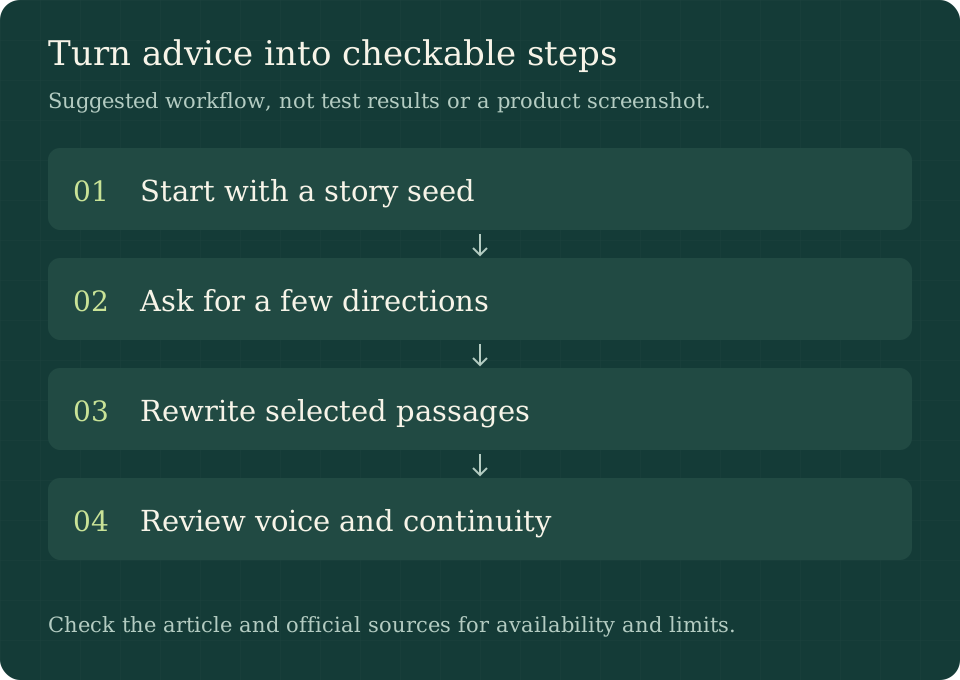
The sequence is your story seed → requested ideas → selective rewriting → author review. This is an editorial exercise based on the available operations, not a transcript of a session we ran.
API keys, private drafts and costs
The README explicitly warns that the development application stores or loads API keys on the client for convenience and that this should be removed in production. Putting a key in a file named .env does not make a browser application safe to publish. Inspect the build and request path before deploying anything publicly.
A local editor can still send text to a remote model. Review the provider's applicable data terms before using confidential manuscripts, client work or unpublished material. Keep an independent copy of your draft. Repository access also does not promise unlimited free inference: provider quotas, billing and model availability are separate questions.
Choosing an alternative by the job
| Your main job | Approach worth considering | Tradeoff to evaluate |
|---|---|---|
| Study writing interaction design | Google PAIR Wordcraft source | Setup and maintenance responsibility |
| Brainstorm occasional story ideas | A general AI chat assistant | More manual movement between chat and manuscript |
| Produce structured documents in ArtCraft | ArtCraft WordCraft | Separate features and product availability |
| Maintain a long manuscript | A writing editor with reliable export and version history | AI features may require another service |
Use the same 300-word passage when comparing options. Ask each tool to obey the same viewpoint and plot constraints; record what you accepted, what you rejected and how easily you recovered the original. This gives you a more useful comparison than counting how much text each model produces.
Limitations that matter for writers
Suggestions can sound polished while flattening a distinctive voice. Longer stories require continuity tracking beyond a single local rewrite. Research software may need dependency or API maintenance, and the sources reviewed do not establish a support commitment or service-level agreement.
Wordcraft is most interesting when you want to explore human–AI co-writing or adapt the interface. If your priority is reliable daily manuscript management, test export, recovery and editing ergonomics before choosing it as your primary workspace.
Frequently asked questions
Is Wordcraft AI a Google product?
It is a Google PAIR research project. The repository explicitly distinguishes it from an officially supported Google product.
Is there a free online Wordcraft editor?
The official workshop is readable online. We did not verify an unrestricted hosted interactive editor, so this guide does not promise one. Local source access and API usage are separate.
Does it use LaMDA or Gemini?
The historical writers workshop describes LaMDA. The current repository README requires a Gemini API key. Follow the source version you use.
Is it the same as ArtCraft WordCraft?
No. They are separate projects with different goals and installation paths. Use the linked ArtCraft review for that document editor.
Can I publish the local app with my API key?
Do not treat the development setup as production-ready. The README specifically warns about client-side key handling; deployment requires reviewing and changing that architecture.
Official sources and next step
Start with the official workshop for examples, then read the repository README if you want to experiment. The model operations and package manifest help developers assess the actual implementation. These sources establish the project's purpose and setup, not a guarantee of present-day installation success.