Anthropic OSS Scanner Guide: Eligibility, Enrollment and Report Triage
How eligible open-source maintainers enroll in Anthropic OSS Scanner, prepare project.yaml and an offline build, and assess private AI-generated security reports.
Anthropic OSS Scanner is a free, opt-in security scanning service for eligible open-source projects. Maintainers enroll through a pull request to an official configuration repository. It is not a command you install to immediately scan any repository, and its emailed findings have not undergone human review.
Reviewed October 12, 2026 against Anthropic's service page, enrollment repository, template and terms. We did not enroll a project, execute its build tools or run a security scan.
What OSS Scanner actually provides
The official service page describes initial and periodic scans using Anthropic's models, with findings delivered privately to maintainers. Its pipeline can double-check suspected bugs, analyze root causes and propose patches. Model verification is still different from a human researcher validating a finding.
The service gives maintainers an optional faster path to receive findings before human review. This can surface useful work sooner, but it transfers more triage responsibility to the project. “No vulnerabilities reported” is not a security certification, and a proposed patch is not automatically safe to merge.
Eligibility: who should apply?
Anthropic considers established projects with a critical impact on infrastructure and user security, using criteria similar to OSS-Fuzz. Exposure to remote attacks and the number of users or dependent projects matter. Acceptance is case by case, and the service says its criteria may evolve.
Applicants must be a lead maintainer or authorized by one; organizational authorization may also be required. Anthropic manually verifies maintainer status. If your project's importance is not obvious, briefly explain the software's role and who depends on it. Also assess your team's capacity: the service is intended for projects already able to keep up with verified high- and critical-severity reports.
Enrollment is a pull request, not a download
Start from anthropics/oss-scanner. Create a directory at projects/<name>/ containing project.yaml, and provide a Dockerfile describing a complete build. A threat model is optional but strongly recommended.
- Confirm authorization and read the service terms.
- Copy the official configuration template and fill in your repository and contact details.
- Add a reproducible Dockerfile and project-specific threat model.
- Validate the configuration and check that the build and tests work offline.
- Submit the enrollment pull request, explaining eligibility where useful.
- After acceptance, monitor the contact mailbox for build failures and findings.
An open pull request does not guarantee acceptance or an immediate scan. The published service does not promise a fixed recurring scan interval.
Configure project.yaml correctly
Use the actual repository template for field names. In particular, its Dockerfile path key is lowercase dockerfile. A minimal example for files stored in your own repository is:
repo: https://github.com/example/project#main
primary_contact: security@example.org
dockerfile: .oss-scanner/Dockerfile
threat_model: .oss-scanner/threat_model.md
disabled: false
These are placeholders. Replace them with your authorized project and a monitored security mailbox. Email addresses in enrollment configuration are public, so choose a suitable alias. The repository does not have to be hosted on GitHub, although enrollment happens through GitHub.
Alternatively, place Dockerfile beside project.yaml in the enrollment directory and omit the dockerfile field. Do not configure both locations. Additional recipients use auto_ccs; encrypted reports use an armored public key under pgp. PGP cannot be combined with additional CCs and sends reports only to the primary contact.
Prepare the build for an offline audit
The setup stage has network access so it can obtain dependencies and build the project. The subsequent security audit runs without Internet access. Fetch everything needed during setup, including test dependencies and fixtures that would otherwise be downloaded on demand.
The repository recommends checking that tests pass in the built image. Its helper commands are tools/validate.py for configuration and tools/check <name> for building the environment and opening an offline shell. These are preparation tools, not the hosted scanner itself.
The helpers require Git, Docker and Python 3 with PyYAML. The alternative tools/check --qemu <name> requires Linux on x86-64 with QEMU instead of Docker. A Windows maintainer should evaluate a suitable Linux environment for that path rather than assume it runs natively. Only build projects you trust: the setup has network access. The helper also installs Claude Code into the image, subject to its own terms.
Write a threat model that reduces noise
Describe where untrusted input enters, which users are authenticated, the intended permission boundaries and what is out of scope. Explain your severity rubric: the same technical issue can have different impact in a public server and an administrator-only maintenance tool.
For example, document whether an import endpoint accepts files from anonymous users, which parser handles them and whether network access is expected. Ask for a minimal reproducer and a regression test where practical. These are examples of useful project context, not claims about a vulnerability in a real application.
Receiving findings and deciding what to fix
After acceptance, Anthropic builds the project in an isolated VM and scans it without Internet access. Build failures go to the primary contact. Findings arrive by email with reproduction information and proposed patches where available.
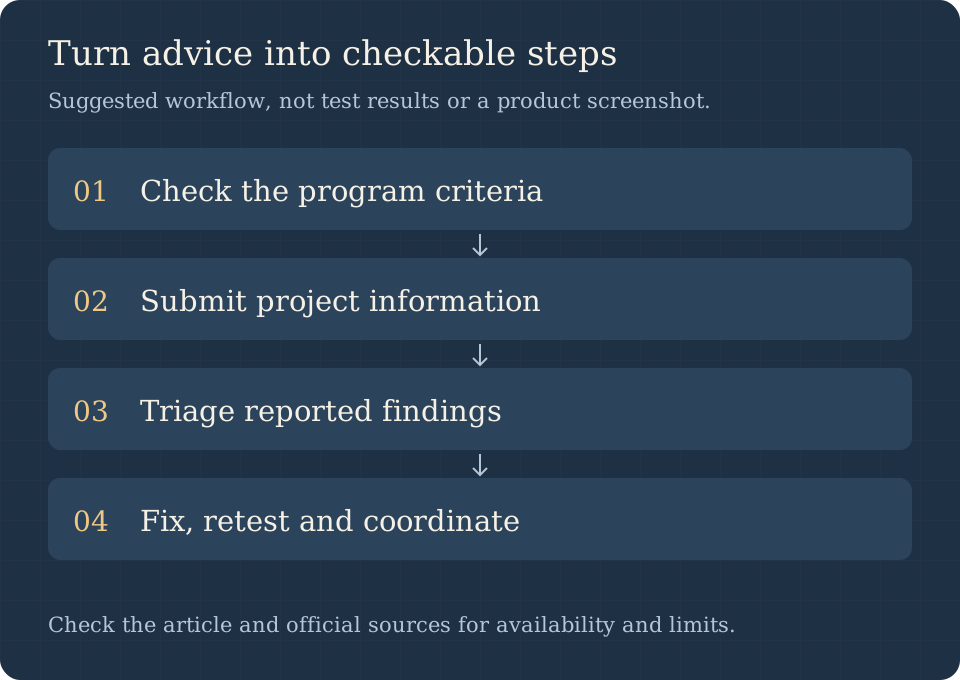
The practical sequence is eligibility → enrollment → maintainer triage → fix and retest. Record the affected revision, reproduce the issue in an isolated environment, check whether an attacker can reach the vulnerable path, and assess the suggested patch against existing behavior. Add a regression test before considering the issue resolved. Keep sensitive reports within the authorized maintainer group.
Disclosure timing needs careful reading
Unvalidated OSS Scanner reports do not start an automatic 90-day disclosure period. However, if Anthropic later validates a report manually through its existing coordinated disclosure program, the policy can allow disclosure starting 90 days after notification of that human validation.
The terms also allow future disclosure-policy changes with advance notice. Therefore, “private reports with no initial clock” is accurate; “these findings can never be disclosed” is not. Follow the current agreement and any later notices when coordinating a fix.
OSS Scanner versus other security tools
| Tool or program | Main role | Important distinction |
|---|---|---|
| OSS Scanner | Free periodic analysis for accepted OSS projects | Enrollment and maintainer triage required |
| Claude Security | Commercial source-code security workflow | Separate access and product terms |
| Dependency audit tools | Identify known vulnerable dependency versions | Complement code and business-logic review |
| General coding agents | Help investigate and implement changes | A coding session is not this scanning service |
The February Claude Code Security announcement describes a separate product and preview; it is not the OSS Scanner signup page. Similarly, an OpenAI Codex coding workflow may help implement a reviewed fix but does not enroll a repository in Anthropic's service.
Costs, cadence and opting out
The service is provided at no cost, but maintainer attention and local preparation still consume resources. Repeated scans depend on pipeline demand, project use and other factors; do not build a release gate around an undocumented schedule.
To pause reports, submit a PR setting disabled: true. To withdraw, remove the project's enrollment directory through a PR. Opting out stops these automated unvalidated reports, while Anthropic's ordinary coordinated disclosure process remains separate. Feedback on findings can be sent by replying to the report email.
Frequently asked questions
Can any developer scan any public repository?
No. This service accepts qualifying projects and verifies maintainer authorization. Public source availability alone does not establish eligibility.
Is there an OSS Scanner CLI I can download?
The public repository supplies enrollment configuration and preparation helpers. Its build checker is not a downloadable copy of the hosted vulnerability scanner.
Are the findings human-reviewed?
No. The service is specifically an opt-in route for model-generated reports before human review. Maintainers must validate impact and patches.
Is every proposed patch ready to merge?
No. The terms warn that patches may be incomplete or break functionality. Review, reproduce and test them like other untrusted proposed changes.
Do I need to pay for a Claude subscription?
OSS Scanner itself is free under its published terms. Claude Security, Claude Code terms and other maintainer support programs are separate; do not infer subscription requirements or benefits from this enrollment alone.
Primary sources
Use the service FAQ for eligibility and reporting policy, the repository and configuration template for preparation, and the agreement for participation and disclosure obligations. Recheck them before enrollment because service policy and helper requirements can change.